


MyCHRISTUS
4.041.00 Reviews
App Specs
- Version
- 3.9.0
- Updated On
- License
- Free
- Downloads
- 50,000+
- Developer
- CHRISTUS Health
- Categories
- Medical
- Platform
- Android
Screenshots
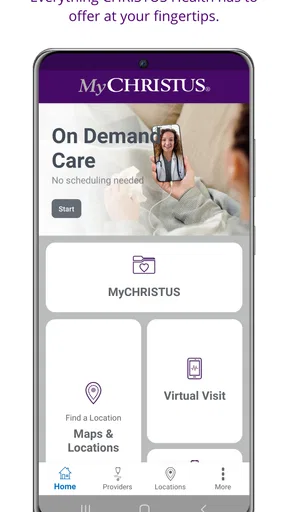
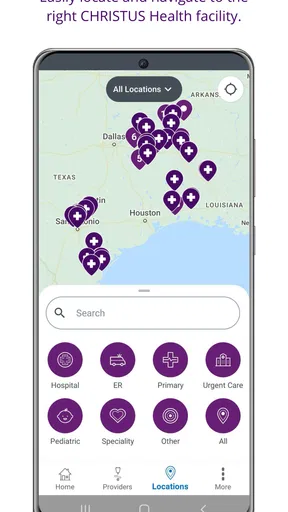
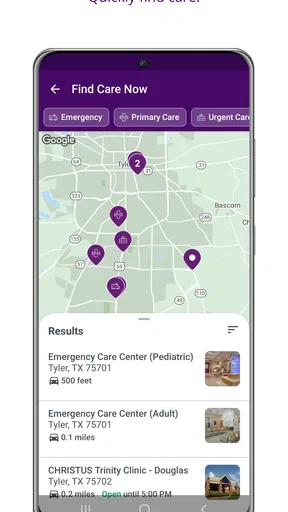
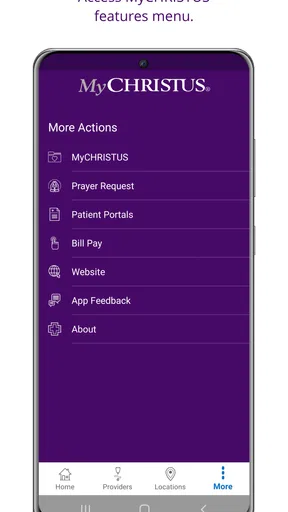
 Analysis by AppCompare
My first impression of MyCHRISTUS is that it is built for a very practical kind of healthcare task: getting access to CHRISTUS Health services from a phone instead of searching through several web pages or making a call for every small question. It is a free medical app from CHRISTUS Health, and its value depends less on entertainment or visual polish than on whether it helps you reach the right health information at the moment you need it.
That distinction matters. A healthcare app is not something I judge like a shopping or social app. I want the important screens to be understandable, the steps to feel predictable, and the experience to remain useful when I am away from home, distracted, or dealing with a health concern. MyCHRISTUS has a clear purpose, but it also sits in a category where connectivity, account access, and the availability of the relevant CHRISTUS services can shape the experience as much as the app itself.
How MyCHRISTUS fits into everyday healthcare
The app belongs to the medical category and carries an Everyone age rating, which makes sense for a healthcare access tool intended for a broad audience. It was released on November 9, 2020, and the current version is 3.9.0. Those details suggest an established product rather than a brand-new experiment, while the 50K-plus install figure shows that it has reached a meaningful number of people without making it one of the huge general-purpose health platforms.
Its store summary describes convenient access to CHRISTUS Health, and that is the right way to understand it. I would not install this expecting a replacement for a doctor, an emergency service, or a complete personal health-management system. I see it as a digital front door to the CHRISTUS Health experience. The best reason to use it is that you already receive care through CHRISTUS Health and want a more direct mobile route to the services connected with that relationship.
The app has an average rating of 4.0 from around 119 ratings, with around 41 written reviews. I treat that as a useful but limited signal: enough to show that people are using it and forming clear opinions, but not enough to assume that every patient will have the same experience. Healthcare apps can feel smooth for one person and frustrating for another because access depends on account details, patient records, appointment arrangements, and the particular service being used.
In my view, the strongest audience is a current CHRISTUS Health patient who wants to handle routine digital access from a mobile device. It can also make sense for someone helping a family member organize healthcare tasks, provided that person is comfortable using the correct account and checking details carefully. I would be more cautious about recommending it to someone who is not connected to CHRISTUS Health, since the app’s usefulness is tied to that healthcare network rather than to general medical information.
Where connectivity becomes part of the experience
The most important practical point is that MyCHRISTUS is a connected healthcare tool. When I am using an app like this, I am not simply opening a static reference guide. I am trying to reach current, account-related information and services. That means the quality of the experience can change with mobile signal, Wi-Fi, server availability, and the state of the session.
Worth Reading Before You Choose

EA SPORTS FC Mobile 26 Is a Bigger Football Game, but It Takes Time

Flipboard Shows What News Apps Must Do Beyond the Feed

Switching to Android Auto Means Rethinking Your Driving Routine

Google Calendar Makes a Crowded Week Easier to Manage

Ludo King Makes the Most of the Minutes Between Plans

Baby Panda World Brings Quick Play to Modern Phones, but Its Game Library Feels Busy
A realistic example is checking something while leaving a clinic. I might want to review the next step in my care, confirm that I am looking at the right account, or prepare for a later task while the visit is still fresh in my mind. In that situation, connectivity is not a technical footnote. If the relevant screen loads promptly, the app feels like a useful extension of the visit. If the connection is weak, the same task can become a source of uncertainty because I may not know whether the problem is the app, the network, or the account.
This is why I would avoid relying on the app as my only plan during an urgent situation. A mobile health portal is suited to routine access and administration, not to replacing immediate medical help. If something is time-sensitive or serious, I would use the appropriate emergency or clinical channel instead of waiting for an app screen to load.
Connectivity also affects when it is sensible to use the app. At home on reliable Wi-Fi, I can take a little more time to review information carefully. In a hospital corridor, parking area, elevator, or rural location, I would expect more friction. I would open the app before I urgently need it, make sure I can access the account, and avoid assuming that a screen I viewed earlier will always be available in the same way later.
Useful mobile situations, and the situations I would avoid
The phone format is most helpful when the task is short and tied to a real-world moment. Healthcare often happens in small bursts: before an appointment, after a visit, while arranging transportation, or when a family member asks what needs to happen next. Having the CHRISTUS Health access point in a familiar device can reduce the temptation to postpone a simple task until I am back at a computer.
I also like the idea of using it as a preparation tool rather than only as a reaction tool. Before leaving for an appointment, I would open the app while connected to a dependable network and make sure I know where I need to go within the account. That small habit can prevent the awkward situation of trying to discover the correct route while standing at a reception desk with a weak signal.
Another useful mobile context is helping someone who is less comfortable with digital healthcare. I could sit beside a parent or relative, let them remain involved in the decisions, and use the phone to navigate the access process together. The important trade-off is privacy and account accuracy. I would not casually switch between people’s healthcare information, and I would double-check whose account is active before reviewing anything sensitive.
On the other hand, a phone is not always the best screen for detailed review. If I needed to read a large amount of information, compare several items, or carefully enter complex details, a computer browser might feel more comfortable. MyCHRISTUS is appealing for quick access, but mobile convenience should not be confused with the best format for every healthcare task.
There is also a practical question about device compatibility. The minimum operating system is version 10, so I would check the phone’s software before planning around the app, especially if the device is older or has not been updated for a long time. For people using a modern supported phone, that requirement is unlikely to be a major obstacle. For someone keeping an aging device for occasional healthcare use, it is worth checking early rather than discovering the limitation during an appointment.
What happens when access does not go smoothly
My biggest reservation with any patient-access app is not whether the first screen looks clean. It is how clearly the experience handles interruptions. A failed connection, an expired session, or a forgotten sign-in can turn a simple task into a frustrating loop. In healthcare, that friction feels more serious because the user may already be worried, tired, or short on time.
I would approach MyCHRISTUS with a simple recovery routine. First, I would check whether the phone has a stable connection rather than repeatedly tapping the same control. Next, I would close and reopen the app if the screen appears stuck. If the problem continues, I would try again later or use the appropriate CHRISTUS Health support route rather than guessing at account details. Repeated attempts with incorrect information can create a second problem when the original issue was only connectivity.
A useful habit is to separate information you need immediately from information you can retrieve later. If I am preparing for an appointment, I would not wait until I am standing outside the building to discover whether I can access the app. I would check beforehand, while I have time to recover from a sign-in issue or find another way to confirm the practical details.
I would also keep expectations realistic after an interruption. If a screen fails to load, I would not assume that an action was completed merely because I tapped a button. I would look for a clear confirmation when the connection returns and, if the task matters, verify the result through the relevant CHRISTUS Health channel. This is not a criticism unique to this app; it is a sensible rule for any connected healthcare service where duplicate requests or missed actions could cause confusion.
The app’s version number, 3.9.0, indicates that it has gone through ongoing updates, which is encouraging for maintenance. Still, an updated app cannot eliminate every dependency on the network or on the underlying healthcare account. A smooth interface cannot fix an unavailable service, and a strong connection cannot fix incorrect account information. Knowing that difference helps me troubleshoot calmly instead of assuming the phone itself is at fault.
Using it without wasting mobile data
Because the app is designed for healthcare access rather than continuous entertainment, I would not expect it to be a major source of mobile-data use in ordinary short sessions. Even so, I prefer to handle account-related tasks over trusted Wi-Fi when I have the choice. That is less about chasing a precise data estimate and more about making the connection stable while I am reviewing personal information or completing an important step.
My practical approach would be to open the app on Wi-Fi before leaving home, confirm that I can reach the account, and then use mobile data only when necessary. I would avoid repeatedly refreshing a page in a weak-signal area, since that can waste time and data without improving the result. If a screen is slow, moving to a stronger connection is usually a better response than pressing the same control over and over.
I would also be selective about background habits. There is no reason to keep a medical access app open all day simply because it is installed. I would use it when I have a specific task, close it when finished, and keep the phone’s normal data and battery settings in mind. These are small choices, but they make the app feel more deliberate and reduce the chance that a connectivity problem becomes part of an already stressful day.
Privacy is another reason to think about where I use it. A public Wi-Fi network may be convenient, but healthcare information deserves the same caution I would apply to banking or other sensitive accounts. If I am in a crowded public place, I would also pay attention to who can see the screen. The app’s mobile convenience is valuable, but it should not encourage careless handling of personal health information.
Compared with a general web search, MyCHRISTUS has a more focused role: it is meant to bring me toward CHRISTUS Health access instead of making me sort through unrelated pages. Compared with calling a clinic, a mobile app can be more convenient for routine digital tasks and can let me work at my own pace. A phone browser may still be preferable when I need a larger layout, when the app is unavailable on my device, or when I am troubleshooting from a computer. The best option depends on the task, not on loyalty to one format.
Who should install it, and who should skip it
I would recommend MyCHRISTUS to people who already use CHRISTUS Health and want a straightforward mobile entry point for their healthcare relationship. It is especially sensible for someone who regularly manages routine tasks from a phone, dislikes searching through a browser, or wants to prepare for visits before arriving. The fact that it is free removes one obvious barrier, and the Everyone rating makes it suitable for a wide range of users from an age-classification standpoint.
I would not recommend installing it just because it is a medical app. If your care is handled by another health system, the app may not offer enough value to justify adding another account and another healthcare application to your phone. Likewise, someone looking for symptom education, fitness tracking, medication reminders, or a broad collection of medical reference material should choose a tool designed specifically for those purposes rather than expecting this app to cover them all.
It is also not the right choice for someone who needs guaranteed access in places without a dependable connection. I would plan around connectivity, particularly before travel or an appointment. The app can be convenient when the network and account are working together, but I would keep essential instructions, contact details, or other genuinely urgent information available through an appropriate backup route.
My overall view is positive but practical. MyCHRISTUS does not need to be an all-purpose health companion to be useful. Its strength is concentration: it gives CHRISTUS Health patients a mobile way to approach healthcare access without treating the phone as a substitute for professional care. The trade-off is that the experience remains tied to online access, account readiness, and the specific needs of a CHRISTUS patient.
After using it as a routine access tool, I would keep it installed if my healthcare is connected to CHRISTUS Health. I would open it before important appointments, use a reliable connection for sensitive tasks, and avoid depending on it as the sole answer during urgent situations. That is the connectivity verdict in simple terms: MyCHRISTUS is most useful when preparation turns mobile access into a convenience rather than an emergency improvisation.
Pros
- Secure access to health records
- appointments
- and test results in one place.
- Easy appointment scheduling with CHRISTUS providers and facilities.
- Prescription refill requests can save time and reduce phone calls.
- Supports virtual visits for convenient access to certain healthcare services.
- Helpful billing tools let users review balances and make payments online.
Cons
- Some features may only work for patients within the CHRISTUS healthcare network.
- Account setup can require personal and insurance information.
- Appointment availability depends heavily on your location and provider.
- Notifications may be inconsistent or require careful permission settings.
- The app is less useful if your care is managed outside CHRISTUS facilities.
FAQs for MyCHRISTUS
What is MyCHRISTUS, and what can I use it for?
MyCHRISTUS is the official patient app for accessing CHRISTUS Health services from a mobile device. After signing in, users can typically review medical information, manage appointments, communicate with care teams, view test results, request prescription refills, check billing details, and access health resources. Available features may vary depending on your location, provider, and the CHRISTUS facilities connected to your account.
How do I create an account or sign in to MyCHRISTUS?
To use MyCHRISTUS, you generally need an existing CHRISTUS Health patient record and must complete the registration process through the app or the CHRISTUS website. You may be asked to verify personal details, provide an activation code, or confirm your identity. If you already use the CHRISTUS patient portal, your existing credentials may work. Contact CHRISTUS support if you cannot verify your account.
Can I schedule appointments and communicate with my doctor through the app?
MyCHRISTUS can make appointment management more convenient by allowing eligible patients to view upcoming visits, request or schedule certain appointments, and receive reminders. The app may also provide secure messaging with participating providers, although response times and messaging availability can differ by department. Emergency symptoms should never be handled through the app; call emergency services or seek immediate medical care instead.
Can I view test results, prescriptions, and medical records in MyCHRISTUS?
Depending on your care team and the connected CHRISTUS location, MyCHRISTUS may display laboratory and imaging results, visit summaries, medications, allergies, immunizations, and other portions of your health record. Some results may appear only after a provider reviews them, while others can be released automatically. Prescription refill requests and pharmacy options may also be available, but not every medication or pharmacy is supported.
Is MyCHRISTUS free, and is my personal health information secure?
MyCHRISTUS is generally available at no additional charge to eligible CHRISTUS patients, although normal mobile data or internet charges may apply. The app uses account authentication and security measures intended to protect personal and medical information. For better privacy, use a strong password, enable device security, avoid signing in on shared devices, and always log out if someone else can access your phone.


